Table of Contents
Every writer has their own process—some carefully craft each sentence, while others move fast and refine later. The tools you choose should work with your creative flow, helping you strengthen your writing without slowing you down.
In this comparison of ProWritingAid vs Grammarly, we’ll break down what each tool offers, how they support your writing goals, and compare their overall experience to help you decide which is the better fit for your writing process.
Quick overview
Both ProWritingAid and Grammarly are long-established softwares that offer strong solutions to improve your writing. However, the tools cater to different audiences, and understanding the strengths of each can help you make the right choice for your specific needs.
ProWritingAid:
ProWritingAid is a powerhouse for creative writers. It offers extensive writing analysis and feedback reports akin to having a personal line editor at a fraction of the cost.
When you’re facing writer’s block, ProWritingAid’s features help you explore alternative ways to express ideas, create sensory-rich descriptions, and brainstorm content.
Plus, you can get deep insights into plot, characters, and pacing for your story, bringing you the kind of feedback expected from a developmental editor. It also includes book marketing tools to help you prepare your story for publication and promotion.
Grammarly:
Grammarly is a great choice for students and professionals who need a tool that offers fast, reliable grammar and spelling checks. It’s designed for users who want immediate fixes without diving too deeply into the mechanics of their writing.
Grammarly is focused on AI-driven solutions that do much of the heavy lifting for you, such as text generation from brief prompts. This makes it a good option for users who need quick edits or work in fast-paced environments where efficiency is key.

Key differences
While Grammarly and ProWritingAid are both useful tools for refining writing, they serve different purposes. Here’s a brief overview of the key differences:
While ProWritingAid has been specifically designed for creative writers, Grammarly caters more to business and academic writing, with suggestions that prioritize clarity and efficiency over creative expression.
Grammarly’s AI-driven features are built for speed and ease, allowing users to quickly generate, rewrite, and refine text with minimal input—whereas ProWritingAid is designed to support creativity, offering suggestions that help you improve your craft rather than doing the work for you.
ProWritingAid provides in-depth editing tools, including detailed style reports, pacing analysis, and dialogue insights, along with genre-specific suggestions tailored to fiction.
ProWritingAid also includes story-level analysis, giving you feedback on elements like plot, character, and world-building across an entire manuscript, as well as tools to support book marketing.
Side-by-side feature comparison
Let’s compare some of the features of Grammarly and ProWritingAid side by side.
Feature | ProWritingAid | Grammarly |
|---|---|---|
Grammar checking | ||
Paraphrasing | ||
Tools to beat writer’s block | ||
Writing style analysis | 25+ advanced style reports | Basic style corrections |
Story analysis and feedback | ||
Tools to market your book | ||
Author comparison | ||
Genre-specific suggestions | ||
Integrations | Desktop, browser extensions, online editor | Desktop, browser extensions, online editor, mobile |
Privacy | Never uses your data | Trains AI on your writing |
Features in ProWritingAid and Grammarly
Here, we’ll look at some of the features in more detail.
Grammar checking
Both ProWritingAid and Grammarly excel at grammar, spelling, and style checking. They easily catch most errors, making them reliable tools for ensuring clean and polished writing.
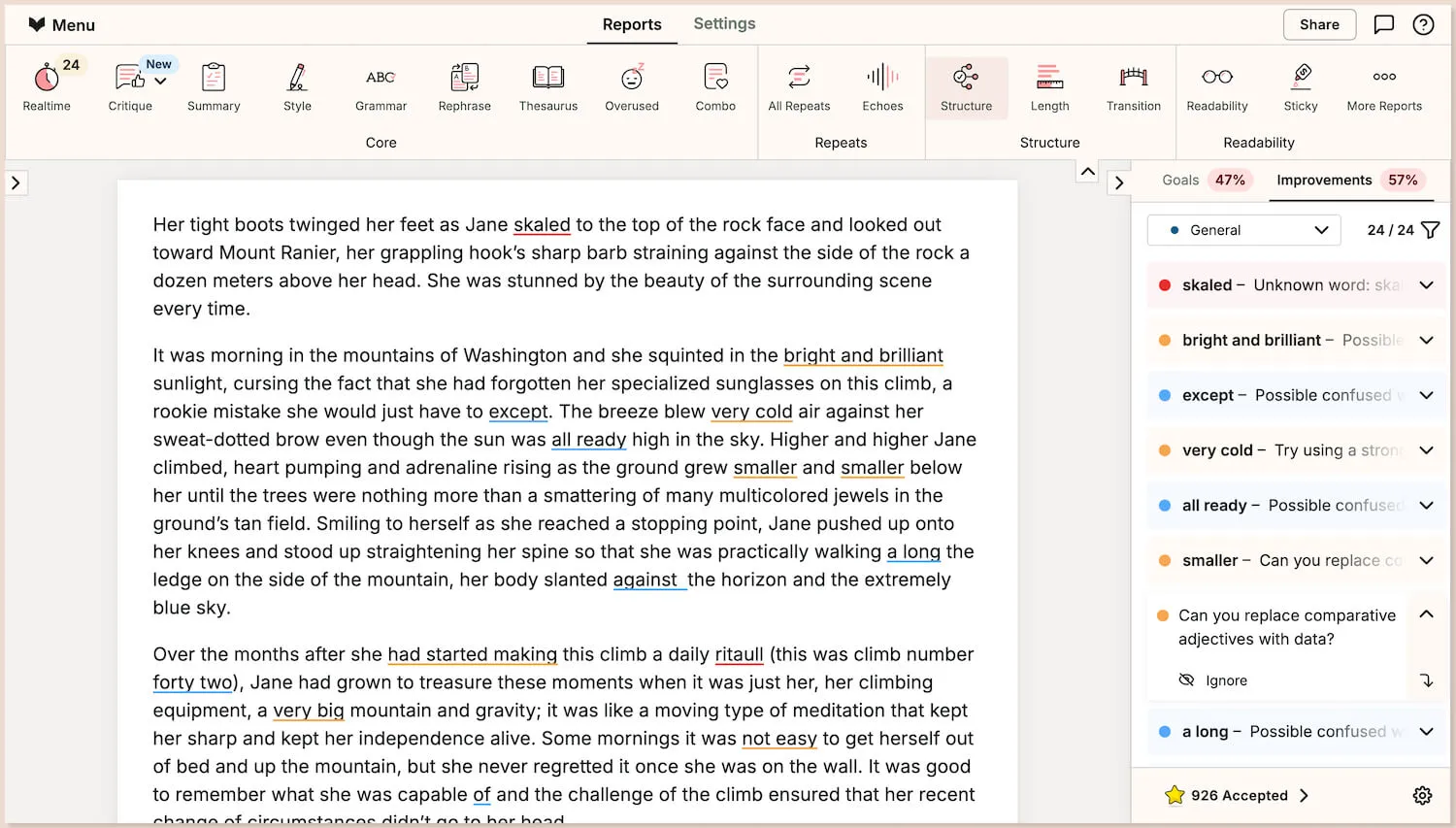
Each platform uses clear, color-coded underlines and offers suggestions to correct errors in a sidebar for easy navigation.
Paraphrasing
Both tools can suggest ways to enhance your writing.
ProWritingAid’s Rephrase feature offers alternative ways to rewrite sentences, such as adding sensory details for richer expression. Meanwhile, the Sparks feature helps you paraphrase longer texts. The aim is to help you explore possibilities, not to bury your authorial voice beneath rewrites.
Recent changes to Grammarly’s paraphrasing features, such as the option to create your own voice, have increased the scope for customization and made them more versatile for different kinds of writing. However, the overall focus is still on efficiency and clarity, rather than on preserving creative control and a writer’s unique style
Tools for inspiration and beating writer’s block
In addition to checking grammar, both tools offer features to provide inspiration and help you overcome writer’s block, but they take a different approach.
ProWritingAid’s Sparks feature is designed specifically for creative writers, aiming to inspire your creativity rather than replace it. It provides insights you can use to strengthen your writing, not to take over the process.
On the other hand, Grammarly aims to do all the heavy lifting for you, enabling quick content creation with minimal input. Its AI allows users to generate and enhance text through simple prompts, making it particularly useful for business writing.
Writing style analysis
When it comes to in-depth analysis, ProWritingAid stands out with over 25 specialized reports that guide you in refining your writing. Each report provides unique insights to help you elevate your work, covering areas such as:
Style
Overused words
Sentence structure
Readability
Sticky sentences
Consistency
Pacing
Sensory
See the full list of reports here.
While Grammarly focuses on providing quick grammar and style suggestions, perfect for fast-paced corrections, ProWritingAid offers more detailed, report-based analysis—something that may be particularly useful for writers who want deeper insight into their writing.
Story analysis and feedback
Grammarly doesn’t currently offer dedicated tools for full story analysis, while ProWritingAid includes several features to provide developmental feedback on a story’s strengths, weaknesses, and areas for improvement. This is most useful for creative writers looking for feedback on their work before seeking input from beta readers.
Chapter Critique provides in-depth insights and recommendations for individual chapters, covering a range of aspects from exposition to style.
Manuscript Analysis gives a comprehensive review of your entire draft, offering feedback and suggestions on aspects like plot, characterization, and pacing.
Virtual Beta Reader gives you a preview of how someone might experience your book, covering things like emotional impact and places where their attention might drift.
Grammarly does offer a “Reader Reactions” feature, designed to highlight what will stick in a reader’s mind and any questions they might have. However, it hasn’t been specifically designed for fiction, so the insights can feel more general.
Grammarly also isn’t built for analyzing entire manuscripts in one go, as its daily word limit is 50,000 words–shorter than many book-length drafts.
Tools to market your book
ProWritingAid’s Marketability Analysis offers customized advice on how to position your book, whether you’re self-publishing or querying with literary agents.
It includes insights into your target audience, industry trends, and more. It also provides templates, resource recommendations, and suggestions for everything from cover designs to social media campaigns.
Grammarly doesn’t currently offer any specialized features to help with book marketing.
Author comparison
The Author Comparison feature in ProWritingAid lets writers compare their style with that of published authors, such as J.R.R. Tolkien and Margaret Atwood, analyzing sentence length and word choice to identify areas for improvement. Grammarly does not currently offer this feature.
Genre-specific suggestions
Grammarly offers the ability to target your suggestions for a number of different document types, including academic, business, general, casual, email, and creative. This means your corrections will be specific for the type of document you’re writing. The creative category doesn’t currently cater to specific genres, however, it will allow for more stylized sentence construction.
With ProWritingAid, you can choose to target your suggestions for over 40 genres, including romance, thriller, mystery, and science fiction, ensuring your writing meets the unique demands of your craft.
Integrations
Both Grammarly and ProWritingAid offer multiple integrations to enhance your writing experience. You can access them through their respective online editors, browser extensions, or desktop apps.
Grammarly also has a mobile app for iOS and Android if it’s important for you to be able to write on the go.
Privacy
ProWritingAid prioritizes your writing and recognizes the concerns surrounding AI. Rest assured, your work will never be used to train ProWritingAid’s large language models.
Grammarly openly uses customer writing to train its AI models. You can opt out, but finding this setting isn’t intuitive, and they don’t advertise it. We had to dig around to find their policy and dig even harder to find the setting.
Pros and cons of ProWritingAid and Grammarly

While ProWritingAid shines with its in-depth features for creative writers, Grammarly is streamlined for professionals who need fast, reliable edits and AI-powered support.
Let’s break down the pros and cons of both tools to highlight how they support different writing styles and objectives.
ProWritingAid
Pros:
Designed for creative writers with genre-specific suggestions
In-depth writing analysis and actionable feedback covering aspects like pacing, dialogue, and readability
The Sparks feature helps with brainstorming, creating sensory-rich descriptions, and overcoming writer’s block
Tools to provide story analysis and feedback on pacing, character development, and plot structure for individual chapters and entire manuscripts
Tools that provide custom recommendations and assets to help you market your book
ProWritingAid does not use your writing to train its AI
Cons:
Not suitable for people wanting to generate large sections of text, as features are designed to inspire rather than write for you
No mobile app, restricting ProWritingAid to web and desktop use, which may not suit users who need on-the-go access
Grammarly
Pros:
Designed for business and academic users, ideal for quick, professional editing
Generative AI to help you brainstorm ideas, create structured outlines, summarize lengthy documents, and craft responses to emails efficiently
Tone detection and adjustments
Mobile app available for Android and iOS
Cons:
Limited features for creative writers, with no tools for in-depth story analysis or book marketing
Basic writing analysis and minimal feedback beyond grammar and spelling
Grammarly uses your writing to train its AI
Pricing: ProWritingAid vs Grammarly
Both ProWritingAid and Grammarly offer limited free versions and monthly plans, but their best value comes with their yearly subscriptions.
For those prioritizing affordability, ProWritingAid’s yearly Premium plan is more cost-effective than Grammarly’s, which you can verify on each site. Additionally, ProWritingAid offers a lifetime plan—a unique option for those who prefer the simplicity of a onetime investment.
Find out more about ProWritingAid’s plans and pricing.
What users are saying: Reviews of ProWritingAid and Grammarly
To provide a balanced comparison of ProWritingAid and Grammarly, we’ve looked at user reviews from Google’s Chrome Web Store. As of this article’s publication, both tools boast impressive scores, with ProWritingAid on 4.8 and Grammarly slightly behind on 4.5. You can explore the reviews to see how these tools are helping writers improve their craft.
While user experiences vary, we’d like to highlight the endorsements from three USA Today Bestselling authors who have found significant value in ProWritingAid.
Leeanna Morgan (59 novels published): “ProWritingAid makes my writing better. Having ProWritingAid has allowed me to bridge the gap between my knowledge as a reader and my ability as a writer.”
Siera London (22 novels published): “ProWritingAid has been a resource in my writer toolkit for many years. The program helps me to craft and clarify my stories for a better reader experience. Your editor will thank you for making their job easier.”
Melle Amade (76 books published): ”No manuscript comes off my computer without it going through ProWritingAid. That alone has saved me $2,000 per manuscript. I rely on ProWritingAid to produce my polished, finished books that I can then publish.”
Final verdict: Which software should you choose?
When it comes to choosing between ProWritingAid and Grammarly, the decision largely depends on your specific writing needs and goals.
For creative writers seeking in-depth feedback and comprehensive analysis, ProWritingAid stands out as a robust tool that goes beyond simple grammar checks. Its features are tailored to enhance storytelling, refine character development, and foster creativity, making it an excellent investment for those looking to elevate their craft.
On the other hand, Grammarly excels in providing quick corrections, making it a favored choice for students and professionals who prioritize speed and convenience. Its AI-driven features streamline the editing process, ensuring your writing is polished and ready for any audience.
Ultimately, both tools offer valuable benefits, and the best choice will depend on whether you need a supportive writing companion for creative projects or a reliable assistant for professional and academic writing. By understanding the strengths and weaknesses of each, you can make an informed decision that aligns with your writing style and objectives.
Whichever tool you choose, enhancing your writing skills is a journey, and both ProWritingAid and Grammarly can serve as helpful allies along the way.
Get started with a free ProWritingAid account and start becoming a better writer today.

Write like a bestselling author
Love writing? ProWritingAid will help you improve the style, strength, and clarity of your stories.
